Presenter demonstrates Fairfax County FIT tool for businesses to track energy and emissions
April 17, 2026 | Fairfax County, Virginia
This article was created by AI summarizing key points discussed. AI makes mistakes, so for full details and context, please refer to the video of the full meeting. Please report any errors so we can fix them. Report an error »
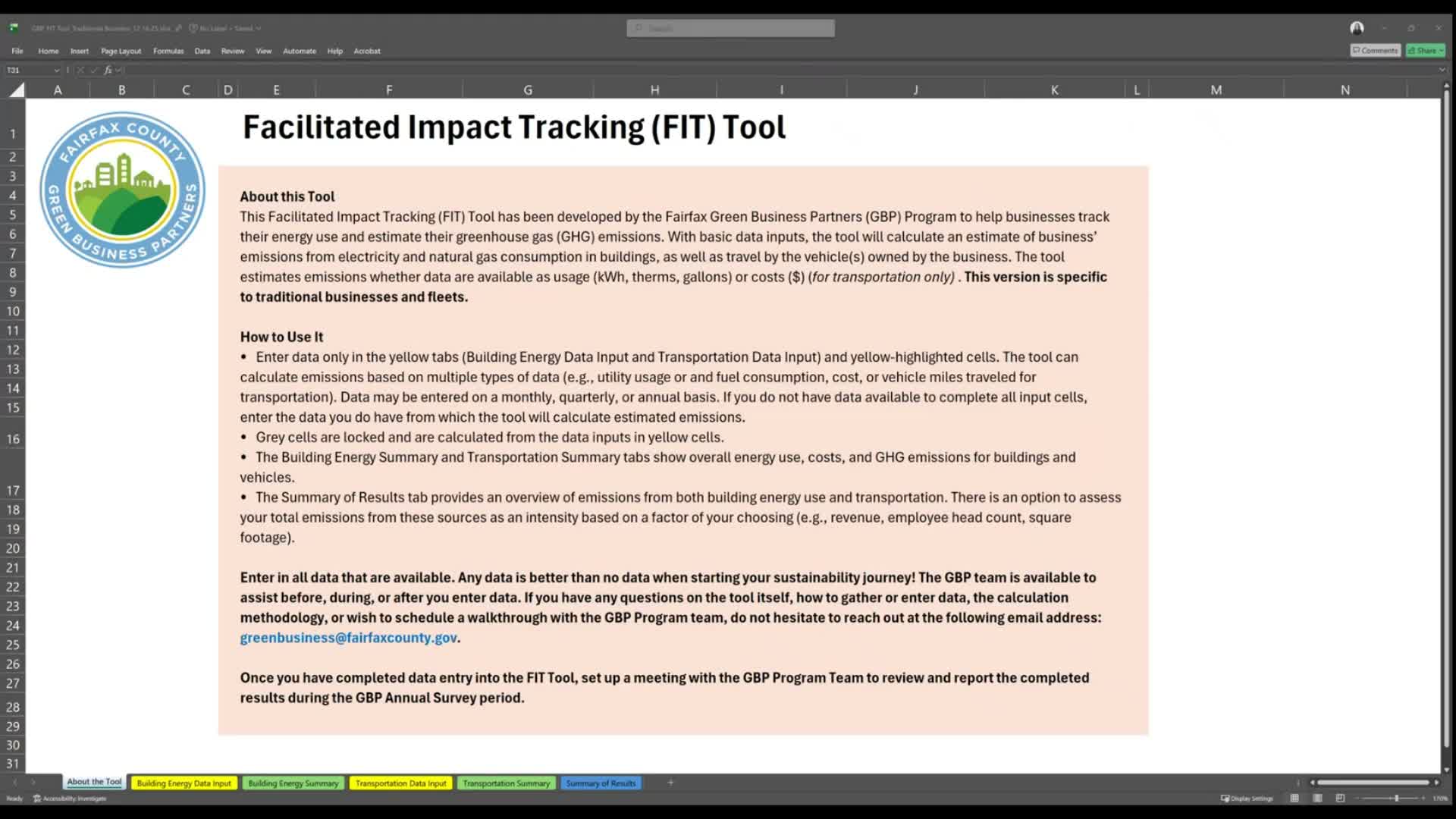
A presenter for the Fairfax County Green Business Partners demonstrated how local businesses can use the Facilitated Impact Tracking (FIT) tool to record electricity and natural gas usage and generate building-level and aggregated greenhouse gas emission summaries.
The presenter said the demo covered steps for traditional businesses to identify utility providers, gather bills, enter building details, and input monthly energy usage so the FIT tool can total energy use and calculate emissions. “In the FIT tool, you'll need to enter your business's electricity and natural gas data into the yellow cells you see on the screen,” the presenter said.
Why it matters: tracking both energy and costs over time helps businesses spot trends and identify avoided costs, the presenter said. The tool uses meter-based consumption—kilowatt-hours for electricity and therms for natural gas—to compute consumption and associated emissions; the presenter cautioned that entering only cost information is not enough to calculate consumption and greenhouse gas emissions.
How it works: Step 1 is to gather the building’s energy bills for the previous calendar or fiscal year and identify energy providers. For Fairfax County, the presenter listed common suppliers: Dominion Energy or Northern Virginia Electric Cooperative for electricity, and Washington Gas or Columbia Gas for natural gas. Step 2 is entering building information (the presenter used the example address 12345 Fairfax Way, Fairfax County). Step 3 is entering monthly electricity usage in kilowatt-hours by locating the billable usage on each bill. Step 4 is entering monthly natural gas usage in therms.
The presenter noted that utility billing periods do not always match calendar months and advised using judgment to allocate usage across months—for example, assigning a bill dated Feb. 25–Mar. 24 to March. The FIT tool can use historical month data on some bills to fill missing months when available.
After data entry, users can click the green building energy summary tab to see per-building totals and a blue table to view an overall summary across all entered buildings. The presenter encouraged businesses to enter any available data: “Any data is better than no data when starting your sustainability journey,” the presenter said.
The demo focused on building energy use; the presenter directed attendees to the GBP membership resources page for additional videos and advised that home-based businesses should consult the separate home-based business demo. For questions, the presenter said to contact the GBP team.
The presenter said the demo covered steps for traditional businesses to identify utility providers, gather bills, enter building details, and input monthly energy usage so the FIT tool can total energy use and calculate emissions. “In the FIT tool, you'll need to enter your business's electricity and natural gas data into the yellow cells you see on the screen,” the presenter said.
Why it matters: tracking both energy and costs over time helps businesses spot trends and identify avoided costs, the presenter said. The tool uses meter-based consumption—kilowatt-hours for electricity and therms for natural gas—to compute consumption and associated emissions; the presenter cautioned that entering only cost information is not enough to calculate consumption and greenhouse gas emissions.
How it works: Step 1 is to gather the building’s energy bills for the previous calendar or fiscal year and identify energy providers. For Fairfax County, the presenter listed common suppliers: Dominion Energy or Northern Virginia Electric Cooperative for electricity, and Washington Gas or Columbia Gas for natural gas. Step 2 is entering building information (the presenter used the example address 12345 Fairfax Way, Fairfax County). Step 3 is entering monthly electricity usage in kilowatt-hours by locating the billable usage on each bill. Step 4 is entering monthly natural gas usage in therms.
The presenter noted that utility billing periods do not always match calendar months and advised using judgment to allocate usage across months—for example, assigning a bill dated Feb. 25–Mar. 24 to March. The FIT tool can use historical month data on some bills to fill missing months when available.
After data entry, users can click the green building energy summary tab to see per-building totals and a blue table to view an overall summary across all entered buildings. The presenter encouraged businesses to enter any available data: “Any data is better than no data when starting your sustainability journey,” the presenter said.
The demo focused on building energy use; the presenter directed attendees to the GBP membership resources page for additional videos and advised that home-based businesses should consult the separate home-based business demo. For questions, the presenter said to contact the GBP team.
Don't Miss a Word: See the Full Meeting!
Go beyond summaries. Unlock every video, transcript, and key insight with a Founder Membership.
✓
Get instant access to full meeting videos
✓
Search and clip any phrase from complete transcripts
✓
Receive AI-powered summaries & custom alerts
✓
Enjoy lifetime, unrestricted access to government data
30-day money-back guarantee
