Burke County Schools outlines online-safety tools; Child Advocacy Center and SROs urge vigilance
April 05, 2025 | Burke County Schools, School Districts, North Carolina
This article was created by AI summarizing key points discussed. AI makes mistakes, so for full details and context, please refer to the video of the full meeting. Please report any errors so we can fix them. Report an error »
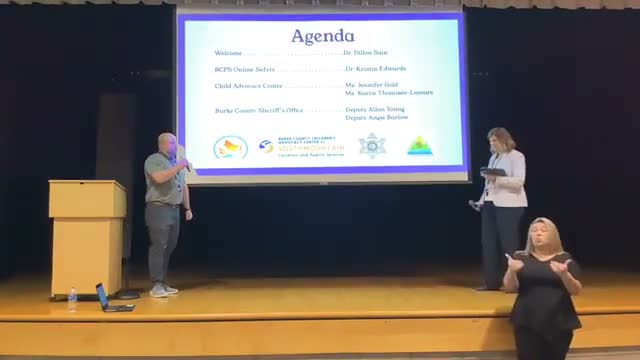
Burke County Schools technology staff, the Burke County Children's Advocacy Center and school resource officers detailed a layered approach to student online safety at a community presentation, emphasizing technical protections, reporting tools and steps parents can take at home.
Kristen Edwards, a member of the district's technology staff, said the district "enable[s] two-factor authentication for all administrative users in our Google, admin suite and in our NC Ed Cloud," and that the NC Ed Cloud links to the student information system (identified in the presentation as Infinite Campus). Edwards described state-provided cybersecurity protections, saying the district uses CrowdStrike for endpoint protection and 24/7 threat monitoring and that MCNC (provided through the North Carolina Department of Public Instruction) applies DNS and content filtering and helps ensure Children's Internet Protection Act (CIPA) compliance.
Edwards described layered, classroom-level and device-level tools: GoGuardian lets teachers monitor student screens and enforce district policies, and Gaggle scans student Gmail and Google Drive with AI that forwards flagged items to a human reviewer for possible escalation to counselors or administrators. "When the AI detects that there could be something harmful, it sends that detection to a real live person," Edwards said, describing how human reviewers assess suicide risk, self-harm, cyberbullying and other threats.
Dylan Sam, director of student company services, described the Say Something reporting app as an anonymous tip system available via school logins that triggers immediate text alerts to administrators and guidance counselors, who coordinate follow-up with SROs. "The Say Something app is 1 of the popular apps among students," Sam said, noting most tips are handled and that the system gives students a way to report concerns without revealing their identity.
Karen Lazier, medical provider at the Burke County Children's Advocacy Center, outlined trends and risks she sees in investigations. "We're a local nonprofit agency that assists law enforcement and child protective services in the investigation of crimes against children," Lazier said, and she called out increased screen time since 2020 and the resulting exposure to online predators, cyberbullying and sexting. Lazier shared a case example in which an 8-year-old, identified in the presentation as "Molly" (a pseudonym), was persuaded in a multiplayer game to exchange explicit images after meeting someone who misrepresented his age; the case was referred to the advocacy center.
Lazier listed apps parents should monitor (Roblox, TikTok, Kik, Whisper and others) and warned that disguised apps (for example, some calculator apps that hide messages) can let children communicate with strangers. She recommended resources including the National Center for Missing and Exploited Children, Darkness to Light training and family-focused strategies such as keeping devices in common spaces and setting consistent limits.
Deputy Angela Barlow of the Burke County Sheriff's Office (also an SRO at Jerome High School) and SRO Allen Young (Freedom High School) defined online enticement, sextortion, scams and identity theft and urged families to report suspicious contact. Barlow described sextortion as when a predator obtains explicit images and then demands money or threatens to share the material; she and Young advised disabling default geolocation, using privacy settings, blocking unknown contacts and reporting threats to law enforcement or cybertipline.org.
Presenters emphasized that technical protections are only one part of a broader approach. Edwards urged parents to "ask questions" with children, set time limits and review privacy settings; Lazier and the SROs emphasized parental supervision, reporting to school staff or law enforcement when appropriate, and using available training resources. The session moved toward a question-and-answer period after the presentations.
Kristen Edwards, a member of the district's technology staff, said the district "enable[s] two-factor authentication for all administrative users in our Google, admin suite and in our NC Ed Cloud," and that the NC Ed Cloud links to the student information system (identified in the presentation as Infinite Campus). Edwards described state-provided cybersecurity protections, saying the district uses CrowdStrike for endpoint protection and 24/7 threat monitoring and that MCNC (provided through the North Carolina Department of Public Instruction) applies DNS and content filtering and helps ensure Children's Internet Protection Act (CIPA) compliance.
Edwards described layered, classroom-level and device-level tools: GoGuardian lets teachers monitor student screens and enforce district policies, and Gaggle scans student Gmail and Google Drive with AI that forwards flagged items to a human reviewer for possible escalation to counselors or administrators. "When the AI detects that there could be something harmful, it sends that detection to a real live person," Edwards said, describing how human reviewers assess suicide risk, self-harm, cyberbullying and other threats.
Dylan Sam, director of student company services, described the Say Something reporting app as an anonymous tip system available via school logins that triggers immediate text alerts to administrators and guidance counselors, who coordinate follow-up with SROs. "The Say Something app is 1 of the popular apps among students," Sam said, noting most tips are handled and that the system gives students a way to report concerns without revealing their identity.
Karen Lazier, medical provider at the Burke County Children's Advocacy Center, outlined trends and risks she sees in investigations. "We're a local nonprofit agency that assists law enforcement and child protective services in the investigation of crimes against children," Lazier said, and she called out increased screen time since 2020 and the resulting exposure to online predators, cyberbullying and sexting. Lazier shared a case example in which an 8-year-old, identified in the presentation as "Molly" (a pseudonym), was persuaded in a multiplayer game to exchange explicit images after meeting someone who misrepresented his age; the case was referred to the advocacy center.
Lazier listed apps parents should monitor (Roblox, TikTok, Kik, Whisper and others) and warned that disguised apps (for example, some calculator apps that hide messages) can let children communicate with strangers. She recommended resources including the National Center for Missing and Exploited Children, Darkness to Light training and family-focused strategies such as keeping devices in common spaces and setting consistent limits.
Deputy Angela Barlow of the Burke County Sheriff's Office (also an SRO at Jerome High School) and SRO Allen Young (Freedom High School) defined online enticement, sextortion, scams and identity theft and urged families to report suspicious contact. Barlow described sextortion as when a predator obtains explicit images and then demands money or threatens to share the material; she and Young advised disabling default geolocation, using privacy settings, blocking unknown contacts and reporting threats to law enforcement or cybertipline.org.
Presenters emphasized that technical protections are only one part of a broader approach. Edwards urged parents to "ask questions" with children, set time limits and review privacy settings; Lazier and the SROs emphasized parental supervision, reporting to school staff or law enforcement when appropriate, and using available training resources. The session moved toward a question-and-answer period after the presentations.
Don't Miss a Word: See the Full Meeting!
Go beyond summaries. Unlock every video, transcript, and key insight with a Founder Membership.
✓
Get instant access to full meeting videos
✓
Search and clip any phrase from complete transcripts
✓
Receive AI-powered summaries & custom alerts
✓
Enjoy lifetime, unrestricted access to government data
30-day money-back guarantee
